

Vouch for marketing teams: know where AI loses you the sale
How marketing teams use Vouch to see where AI assistants drop the brand in a buying conversation, which rival they recommend instead, and what to fix first.
Last updated by Vouch
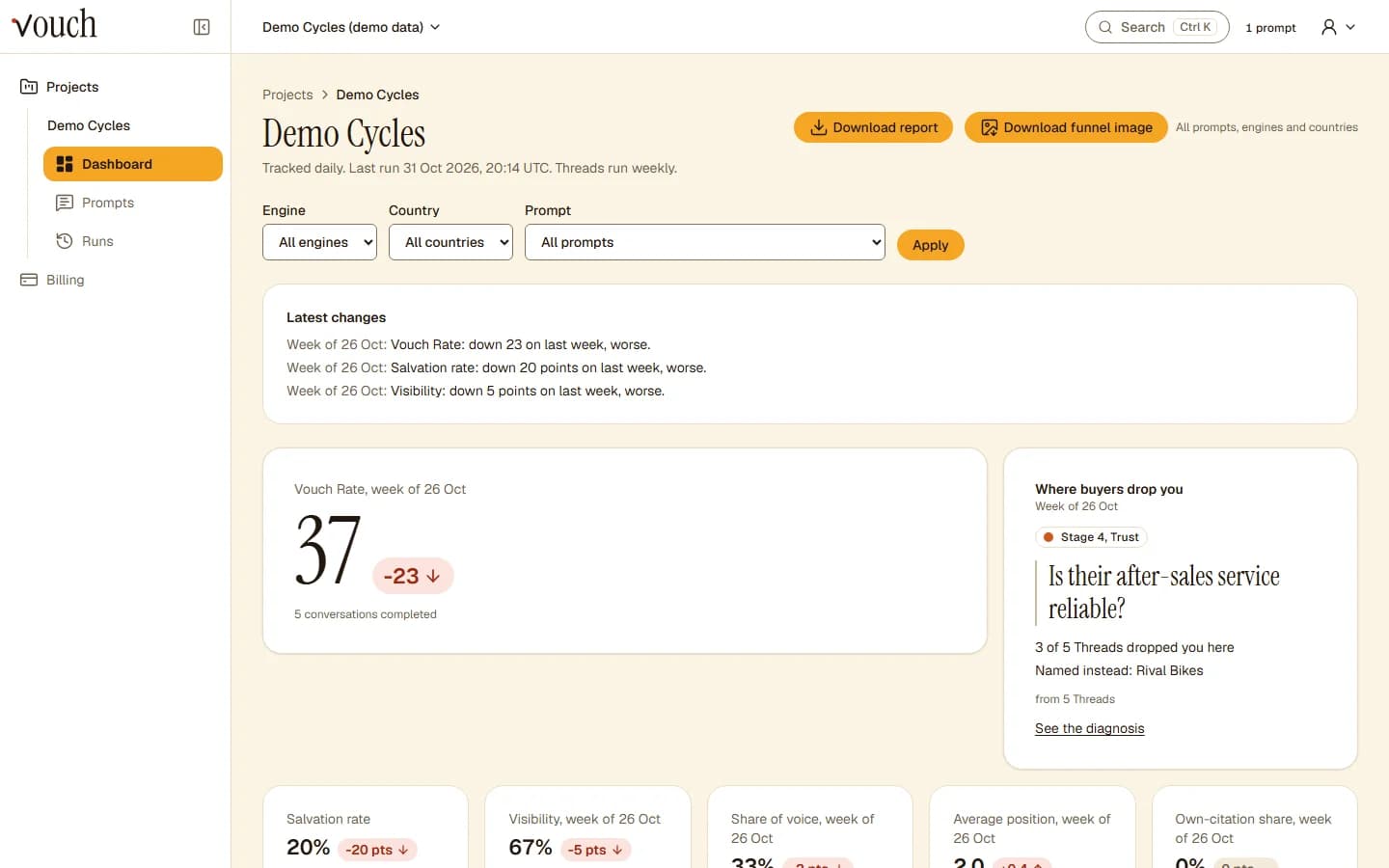
The problem
More of your buyers ask an AI assistant before they buy, and you have no view of what it tells them. Someone on the team asks ChatGPT about the category, the brand comes up, and everyone relaxes. Then a sales call mentions a rival "the AI recommended", and nobody can say why.
The answer to the first question is not the whole story. Buyers keep asking: compare these, what are the downsides, can I trust them, is it worth the money, which one should I buy. Your brand can be in the first answer and missing from the last one, and that last one is the one that turns into a sale.
How Threads answer it
Think of a Thread as a mystery shopper for AI answers. It plays your buyer through six questions in order (Discovery, Shortlist, Objection, Trust, Value and Decision), then tells you, in plain terms, the stage where your brand stopped being named, the question that did it and the rival recommended in your place. Daily tracking covers ChatGPT, Claude, Gemini, Perplexity, Google AI Overviews, Google AI Mode and Copilot (see the methodology for how each is collected); Threads run on ChatGPT, Claude, Gemini and Perplexity.
That follow-up is your killer question. It usually points at something specific: a missing service page, a complaint that nobody answered, a price nobody explained. Vouch suggests what to publish for that stage, and the Vouch Rate tracks whether the fix works, week by week. The methodology explains how answers are collected and scored, and what happens after the first answer walks through the six stages with an example.
Answers vary from run to run, so each Thread runs three times a week, and a week with too few completed conversations says so instead of showing a number.
With Vouch and without
| Without Vouch | With Vouch |
|---|---|
| "We came up in ChatGPT" | Share of voice and average position against named rivals, every day |
| No idea what happens after the first answer | The stage and the question where the brand drops out |
| A rival "the AI recommended" | The brands named instead, and the sources cited at that stage |
| A to-do list based on hunches | Recommendations tied to the stage where you are lost |
| No number to report | The weekly Vouch Rate and salvation rate, plus an HTML report |
Start in three steps
- Add your brand and the rivals your sales team hears about most.
- Add the prompts from your buyer research: the questions prospects ask before a first call, in their own words, for each market you sell in.
- Read the first Threads with your content lead: agree the stage you lose most often and the one page to publish for it, then watch the Vouch Rate.
The pricing page lists what each plan includes.
Common questions
What is the Vouch Rate?
It is one score for how well your brand survives AI buying conversations. Each completed Thread scores from 0 to 1, from the stages your brand survives and whether the final answer recommends you. The Vouch Rate is the week's average, times 100. The methodology page shows the formula.
How often does Vouch check?
Tracking runs once a day for every prompt, assistant and country. Where Threads are on, each Thread runs three times a week, because assistants rarely give the same answer twice.
Can I share results with leadership?
Yes. Every paid plan can download an HTML report for a project. Vouch has no CSV export and no alerts today.
Can I get access today?
Vouch is invite-only for now. Join the waitlist on this page and we will email you when there is a place.